
Claude Code diff viewer: see what changed, without opening your editor
A short guide to reviewing Claude Code changes across git worktrees on macOS. Updated September 2026.
When Claude Code (or Codex, or any terminal agent) runs, it can touch dozens of files in
seconds. The usual way to see what changed is to stop, git status, open an
editor, and read diffs one by one, which pulls you out of the terminal and slows the loop.
This guide shows a faster way: watch the changes live in a git worktree GUI,
beside your terminal, and peek each diff inline without opening an editor. It works the same
whether Claude runs in your main checkout or in a worktree it created with
claude --worktree (see Claude Code worktrees, explained).
Why reviewing agent changes is awkward
- Agents edit many files at once, so a flat
git diffis a wall of text. - Opening each file in your editor breaks focus and buries the shape of the change.
- With several agents in parallel worktrees, it's hard to keep track of which tree changed what.
- The desktop app and VS Code extension have their own diff views, but if you run Claude Code in a terminal, you're on your own.
The fast path: watch the worktree live
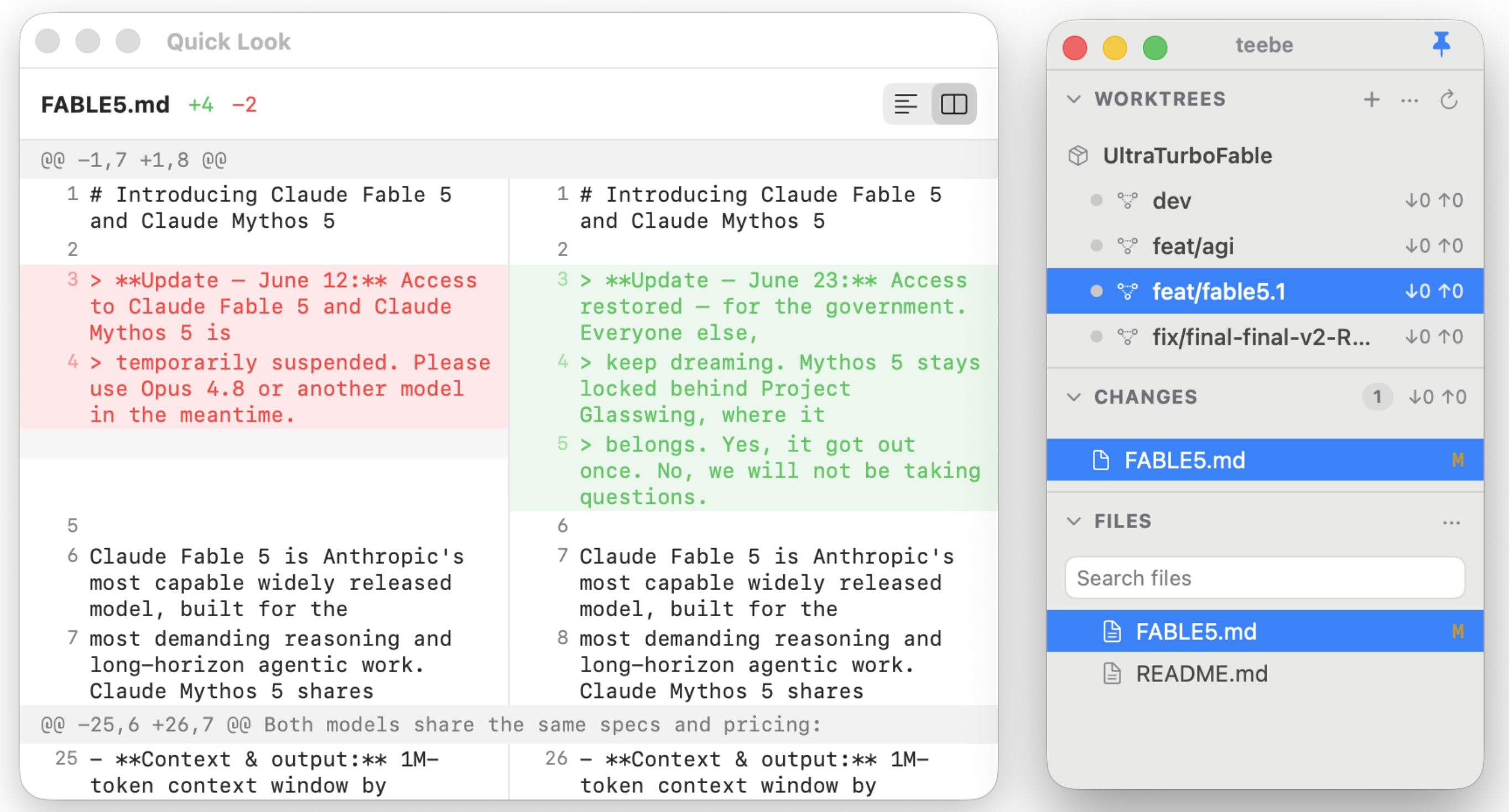
teebe is a native macOS git worktree GUI that sits beside your terminal and shows what your agents are doing on disk, as it happens:
- Point it at a worktree. Pick any git worktree of any repo and browse its full file tree.
- Watch files badge live. Every file an agent touches lights up the moment it changes on disk, with no refresh and no re-running
git status. - Peek the diff inline. Click a changed file to see its git diff right in the window, without opening an editor or a git client.
- Open it for real when you want. Click through and the file launches in whatever native editor you already use.
Watching several agents at once
Because teebe watches the filesystem and git directly, it doesn't care which agent made the change. Add multiple repos and worktrees side by side and you get one calm view of several Claude Code sessions running in parallel, each with live badges and ahead/behind counts, so you can review what every agent changed at a glance instead of tailing logs.
What teebe doesn't do
teebe is the navigator, not the editor or the orchestrator. It never writes to your files and never runs your agents. You keep doing that in the terminal. It also isn't a full git client: for staging, committing, or resolving conflicts you'll still reach for your usual tools. Its one job is to show you, live, what changed. If you're deciding between tools, the git worktree GUI comparison covers what else exists.
curl -fsSL https://teebe.io/install.sh | bash
Free · open source · macOS 14+. Back to teebe.io →